Dec 30, 2025
On-Device Voice Dictation with Whisper
SourceOverview
Over the past year, AI voice dictation has had a meteoric rise, powered by startups like Wispr Flow and Willow. I've spent the last few weeks using these tools and the productivity gains were clear. But I could never shake the "Big Brother" feeling of having every word I speak transcribed and sent to remote servers, possibly retained without my knowledge.
That's why I built a fully on-device, open source voice dictation tool leveraging OpenAI's Whisper model optimized for Mac's unified memory architecture. Three key benefits of running locally:
- Privacy. Your audio never leaves your computer. There's no cloud service logging your dictation, no third party storing transcripts of your thoughts, and no network traffic to intercept.
- Cost. Cloud transcription APIs charge per minute of audio. OpenAI's Whisper API runs $0.006/minute, which adds up for heavy users:
- 1 hour/day of dictation = ~$0.36/day = $10.80/month
- 4 hours/day (heavy use) = ~$1.44/day = $43.20/month
Running the model locally means unlimited transcription after the initial setup.
- Latency. The OpenAI Whisper API typically takes 2-5 seconds for short utterances, with users reporting 3+ seconds even for simple sentences. Running locally on Apple Silicon eliminates network overhead entirely—transcription completes in 0.5-1 second for typical dictation.
Why macOS Only?
This project specifically targets macOS—and more specifically, Apple Silicon Macs. The reason comes down to a fundamental difference in how these machines handle memory.
Traditional computers maintain a strict separation between CPU and GPU memory. When you want to run a neural network on the GPU, you first load the model into CPU memory, then copy it to GPU memory. For a model like Whisper (ranging from 150MB to 3GB depending on size), this copying adds overhead and limits how quickly you can start processing.
Apple Silicon takes a different approach with what Apple calls "unified memory architecture" (UMA). The CPU, GPU, and Neural Engine all share the same pool of physical memory. There's no copying between separate memory spaces—the same bytes are directly accessible by all processors.
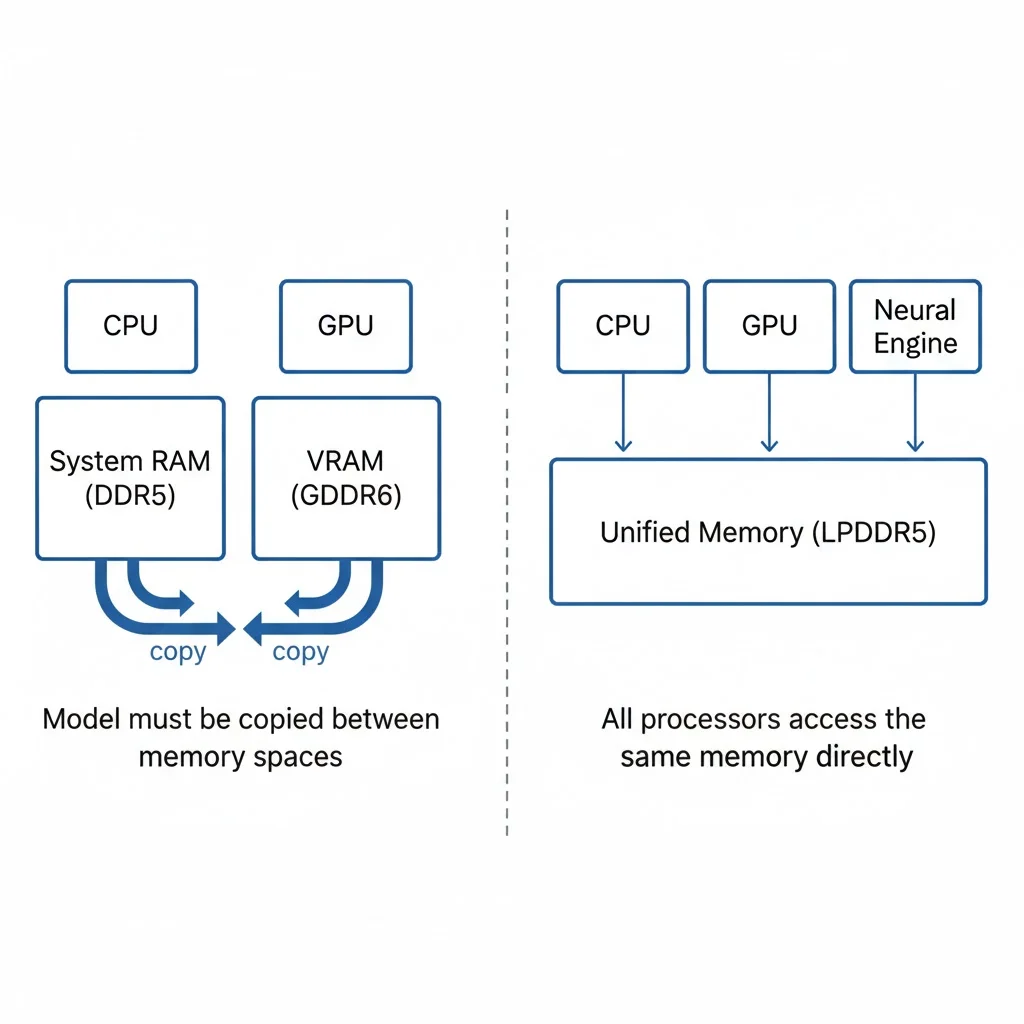
This architecture enables MLX, Apple's machine learning framework designed specifically for Apple Silicon. MLX Whisper achieves 2-3x faster inference compared to running the same model on a traditional CPU, with transcription latency around 0.5-1 second for typical speech. The project falls back to Faster Whisper on Intel Macs, but performance degrades to 2-3 seconds per transcription.
How It Works
The interaction model is simple: hold Cmd+Control to record, release to transcribe and inject text.
Hold Cmd+Control → Record Audio → Release → Transcribe → Text InjectionWhen you press the hotkey combination, the app starts capturing audio from your microphone using PyAudio. Audio streams into a buffer at 16kHz sample rate—the native rate Whisper expects. When you release the keys, recording stops and the audio is saved to a temporary WAV file.
The transcription pipeline then takes over. On Apple Silicon, MLX Whisper loads the model (defaulting to "base" size for a balance of speed and accuracy) and processes the audio entirely on the GPU cores. The model outputs raw text, which optionally passes through Ollama for cleanup—removing filler words like "um" and "uh," fixing punctuation, and correcting minor grammatical issues.
Finally, the cleaned text gets injected into whatever application has focus. The injection uses a clipboard-based approach: save the current clipboard contents, copy the transcription, simulate Cmd+V to paste, then restore the original clipboard. This ensures compatibility across all macOS applications without requiring per-app integration.
A menu bar indicator shows the current state: ○ for idle, ● for recording, ◐ for processing.
Quick Start
Installation
# Install PortAudio (required for microphone access)
brew install portaudio

# Clone and install
git clone https://github.com/chrisvin-jabamani/whisper-on-device.git
cd whisper-on-device
pip3 install -r requirements.txt
Permissions
macOS will prompt for three permissions on first run:
- Microphone Access — Allow when prompted
- Accessibility — System Settings → Privacy & Security → Accessibility → Add Python
- Input Monitoring — System Settings → Privacy & Security → Input Monitoring → Add Python
Usage
python3 main.pyClick into any text field, hold Cmd+Control, speak, release. Text appears.
Optional: LLM Cleanup
For cleaner transcriptions, you can enable Ollama post-processing:
brew install ollama
ollama pull llama3.2:1b
ollama serve
Then edit main.py and change enabled=False to enabled=True in the TextPostProcessor initialization. This transforms "So um I was thinking that uh we should like maybe go to the store" into "I was thinking that we should go to the store."
Performance
| Hardware | Backend | Latency |
|---|---|---|
| Apple Silicon (M1/M2/M3/M4) | MLX Whisper | ~0.5-1s |
| Intel Mac | Faster Whisper | ~2-3s |
The backend is automatically selected based on your hardware.
Model Size
| Model | Size | Speed | When to Use |
|---|---|---|---|
| tiny | 75MB | ~0.3-0.5s | Fast but error-prone. Good if you'll review anyway. |
| base | 150MB | ~0.5-1s | Default. Best balance for dictation. |
| large | 3GB | ~3-5s | Overkill for dictation. Only helps with difficult audio. |
To change models, edit transcriber.py and replace "base" with your preferred size.